Headless CMS vs Traditional CMS: Which One Does Your Business Actually Need?
Choosing between a headless CMS and a traditional CMS is one of the most debated decisions in modern web development. And honestly, the answer isn't as clear-cut as most blogs make it out to be. The right choice depends on your business goals, your team's technical skills, and where you see your digital presence heading in the next few years. Let's walk through both options properly, so you can make a confident decision instead of guessing.
What Is a Traditional CMS?
A traditional CMS is what most people picture when they think of a website builder. Platforms like WordPress, Joomla, and Drupal fall into this category. The system bundles everything together the back end where you write content, and the front end where visitors see it as one complete package. You log in, write a post, choose a theme, hit publish, and the CMS renders everything into a finished webpage. It's straightforward, familiar, and powers a huge portion of the internet for a reason.
What makes a traditional CMS work well:
- Everything is bundled in one place back end and front end together
- Built-in themes and templates handle the design for you
- WYSIWYG editing means content teams see exactly what visitors will see
- Massive plugin libraries extend functionality without writing code
- Quick to launch, even without a dedicated developer
What Is a Headless CMS?
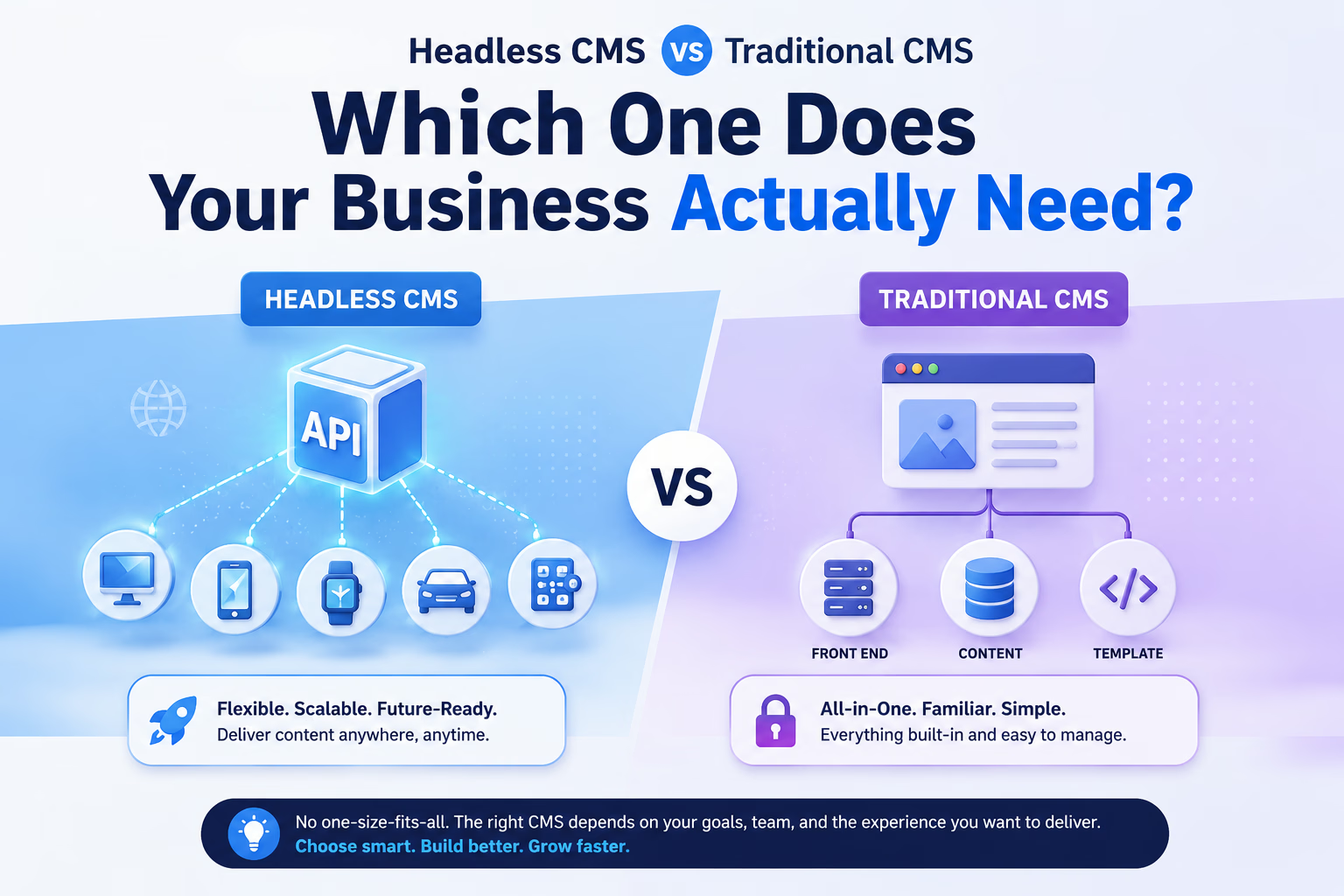
A headless CMS takes a different approach. It separates the content storage from the presentation layer. Your content lives in the back end, but instead of being rendered into web pages automatically, it's delivered through an API usually REST or GraphQL. Your front end whether it's a website, mobile app, smart TV interface, or even a digital billboard pulls that content and decides how to display it. Popular platforms in this space include Contentful, Sanity, Strapi, Prismic, and Storyblok.
What makes a headless CMS different:
- Content is delivered through an API, not rendered into pages
- The front end is completely decoupled, so developers choose any framework
- Publish once and display content across multiple platforms
- No default design or templates the front end is built from scratch
- Back end and front end scale independently
The Core Architectural Difference
Here's a simple way to think about it. A traditional CMS is like a complete restaurant meal served on a single plate the food is cooked, plated, and ready to eat. A headless CMS is like a high-end kitchen producing premium ingredients. You decide how to plate them, depending on who you're serving. In practice, a traditional CMS handles everything server-side. A user requests a URL, the CMS builds the page, and returns finished HTML. A headless CMS doesn't care about how the content gets displayed. It just hands the content over via API, and your front end takes it from there.
Performance: Which One Is Actually Faster?
Performance matters more than ever, especially since Google's Core Web Vitals directly affect your search rankings.
Traditional CMS performance
Out of the box, traditional platforms can feel sluggish particularly when loaded with plugins and a heavy custom theme. The good news is that with proper caching, a CDN, and image optimisation, you can get them running fast. The catch is that speed becomes something you actively maintain, rather than something you get for free.
Headless CMS performance
Headless setups, especially when paired with a static site generator like Next.js, Gatsby, or Nuxt, can be exceptionally fast. Pages are pre-built at deploy time and served from a CDN, meaning visitors receive near-instant page loads. This translates to strong Core Web Vitals scores almost by default. The trade-off is real, though. Build times can increase significantly for very large sites, and real-time updates require extra architecture either Incremental Static Regeneration or client-side fetching.
Developer Experience and Flexibility
Traditional CMS
Platforms like WordPress have huge ecosystems, massive communities, and detailed documentation. A skilled developer can launch a full website in hours. The downside is that you're working inside the platform's rules. Complex customisations sometimes feel like fighting the system instead of building with it.
Headless CMS
Headless gives developers complete freedom. Want to use React, Vue, Svelte, or even plain HTML? Go for it. Modern teams love this flexibility because they can use best-in-class tools instead of being locked into one ecosystem. The trade-off is responsibility there's no default theme, no built-in routing, no one-click SEO plugin. Everything has to be intentionally built.
Content Editor Experience
This is where the conversation gets interesting, and where traditional CMS still has a real advantage. In a traditional CMS, a non-technical editor can log in, write a post, drop in some images, preview how it'll look, and publish all without involving a developer. The experience is visual, intuitive, and forgiving. In a typical headless CMS, editors work with structured form fields. Title here, body here, image there. They don't see a live visual preview unless a developer builds one. For small teams or non-technical businesses, this can feel restrictive. To be fair, platforms like Storyblok and Builder.io are addressing this with visual editing layers, and the gap is shrinking. But for now, traditional CMS still wins on pure editorial comfort.
SEO: Which Setup Gives You the Edge?
Both can achieve excellent SEO, but they get there differently. A traditional CMS like WordPress, combined with plugins like Yoast SEO or Rank Math, handles most on-page SEO tasks from a dashboard. Meta tags, XML sitemaps, canonical URLs, structured data all manageable without writing code. A headless CMS requires developers to implement SEO functionality in the front-end framework. With Next.js, for example, you'd manage meta tags through components, generate sitemaps programmatically, and configure structured data manually. More work upfront, but also more control and the performance benefits of static rendering often translate directly into better rankings.
Omnichannel Delivery: Where Headless Pulls Ahead
This is the area where headless has a clear, undeniable advantage. If your business needs to deliver content across multiple platforms a website, mobile app, voice assistant, kiosk, smart watch, digital signage a headless CMS makes this seamless. One content source, multiple destinations. Update a product description once, and it reflects everywhere instantly. Traditional CMS platforms were built to render web pages. You can technically extend them to power mobile apps or other surfaces, but it requires workarounds. It's not what the architecture was designed for.
What Should You Budget For?
Traditional CMS costs
- Hosting: anywhere from $5 to $50 per month depending on quality
- Themes and plugins: many free options, with premium ones ranging from $30 to $200
- Development: lower upfront cost, though customisation and maintenance add up over time
Headless CMS costs
- CMS platform: many offer free tiers, with paid plans typically $100 to $500+ per month
- Front-end hosting: Vercel and Netlify offer generous free tiers for static sites
- Development: significantly higher upfront cost you need developers comfortable with modern JavaScript frameworks
The honest summary is that headless is more expensive to build and maintain for most small businesses. The investment pays off when you need scalability, performance at scale, or omnichannel reach.
Real-World Use Cases
Choose a traditional CMS if:
You're running a blog, small business website, or informational site Your team is non-technical and needs to manage content independently You need to launch quickly with a limited budget Your website doesn't need to power a mobile app or multiple platforms You value access to a huge plugin ecosystem
Choose a headless CMS if:
You're building a large-scale e-commerce platform with high traffic You need to publish content across a website, mobile app, and other surfaces Your development team is comfortable with modern JavaScript frameworks Page speed and Core Web Vitals are a strategic priority You expect significant growth and need infrastructure that scales You want full control over the front-end technology stack
The Hybrid Approach Is Becoming the Norm
It's worth noting that the line between traditional and headless is blurring. WordPress now offers a REST API and a GraphQL plugin called WPGraphQL, letting it function as a headless back end while keeping its familiar editing interface for content teams. This "WordPress as a headless CMS" approach has become popular with teams that want developer freedom without losing editorial comfort. Storyblok is another example of a platform designed as hybrid from the start it offers a visual editor for content teams while exposing everything through an API for developers. This middle ground is increasingly where the industry is heading.
The Final Verdict
There's no universally correct answer, and anyone telling you otherwise is oversimplifying things. A traditional CMS remains the right choice for most small-to-medium businesses that need a reliable, manageable, cost-effective website with a strong editorial experience. It's proven technology that does its job well. A headless CMS is the right choice when you're building for scale, performance, and multi-platform delivery and when you have the development resources to support it. The flexibility is genuine, but so is the added complexity and cost. Before deciding, ask yourself three honest questions:
Who manages the content day to day? If it's non-technical team members, weigh the editor experience heavily. Where does the content need to appear? If the answer is just your website, traditional CMS is likely all you need. What are your growth and performance goals? If traffic, speed, and scalability are priorities, headless becomes much more compelling.
Get those three answers right, and the decision largely makes itself.
Still weighing the options for your project? Drop a comment below or reach out we're happy to help you think it through.
Ready to build?
Let's turn the idea into something shipped.